
In recent years, AI has made significant revolutions in almost every field, transforming how tasks are executed. One of the areas where AI has a remarkable influence is image editing and enhancement, which required advanced software, high-level skills, and time investments in the past. Here, the background-removing capabilities of AI are no exception, which has transformed to achieve precise results.
Several AI background removers exist in the online market, isolating the image’s main object from its background without considerable effort. They leverage deep learning and computer vision techniques to detect and separate the foreground from the background automatically. If you wish to discover such a powerful background remover, you must consult this article till the end.
Part 1. Unleashing the Power of Best AI Background Remover – insMind
When someone investigates an AI background remover that is trained with a vast variety of datasets, the name insMind background remover emerges at the top. It is equipped with AI capabilities, which significantly eliminates the need for manual adjustments, and mainly works with automation. If you are an advertising company that is marketing products, this tool would help enhance the product image by adding a professional background to it.
All you need to do is upload the image and let the AI remove the background, even with tricky edges such as hair and graphic outlines. After applying the automatic remover, you can edit the cutout or try insMind’s smart remove system, which allows you to define the nature of the cutout. You can also maneuver the background removal process by defining the brush size and hardness.
Part 2. Step-by-Step Instructions to Remove Background With insMind
Remember, insMind isn’t bound to just remove the background, as it can also change the background of an image. In this regard, it offers a vast library with outdoor, minimal, or birthday categories from which users can choose a background. To learn how to use this background remover efficiently, below are step-by-step instructions to guide you through the most straightforward process:
Step 1. Upload the Image and Get the Background Removed
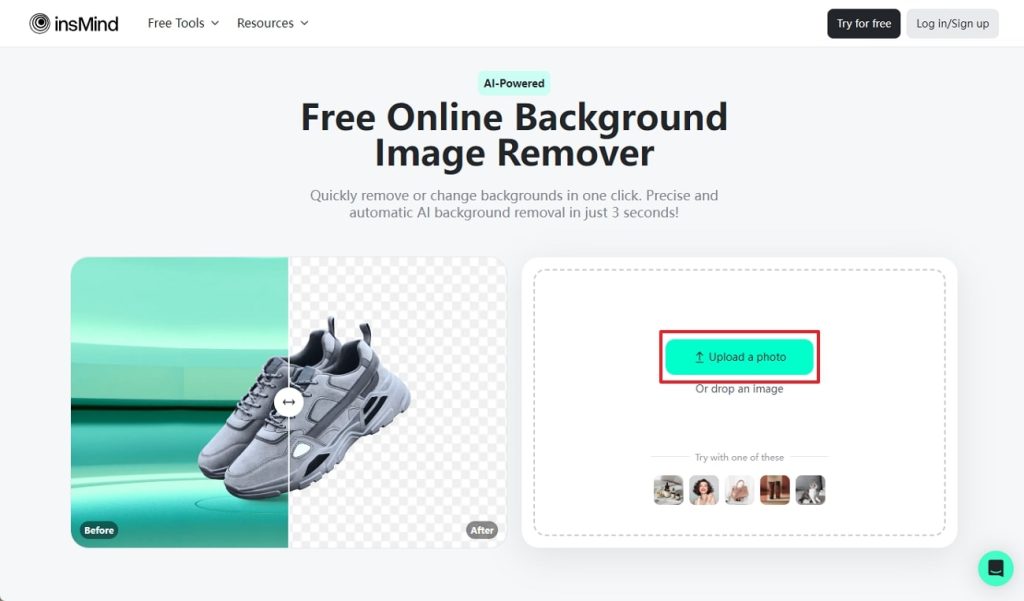
Launch the official site of insMind and access its AI background remover webpage. There, hit the “Upload a photo” button and select an image from your system to upload by tapping the “Open” button. Upon uploading the image, you will enter another screen where the background will be removed.
Step 2. Add a New Image Background Using the insMind Library
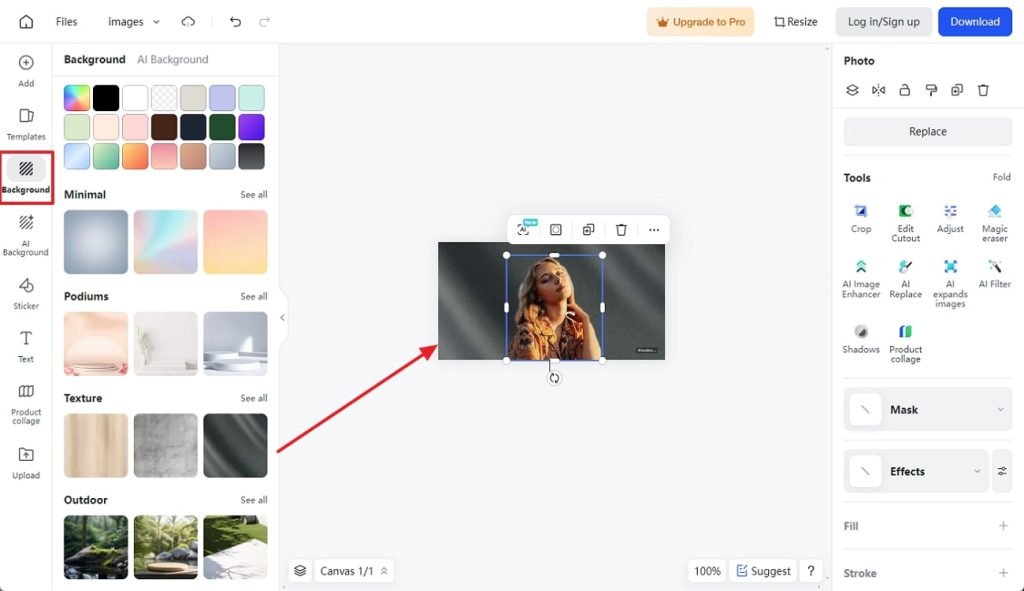
Once the background is eliminated and you wish to add a new one, navigate to the left-side panel. Click the “Background” icon from the left and browse through the categories to pick a suitable background. When you are done with the selection, select one, and it will be added to the image automatically.
Step 3. Use the AI-generated Background in Your Image
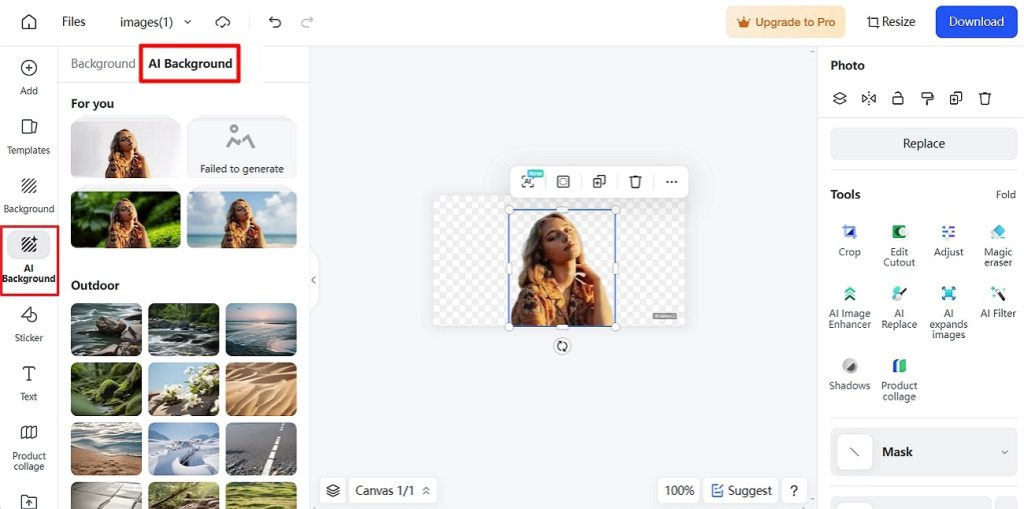
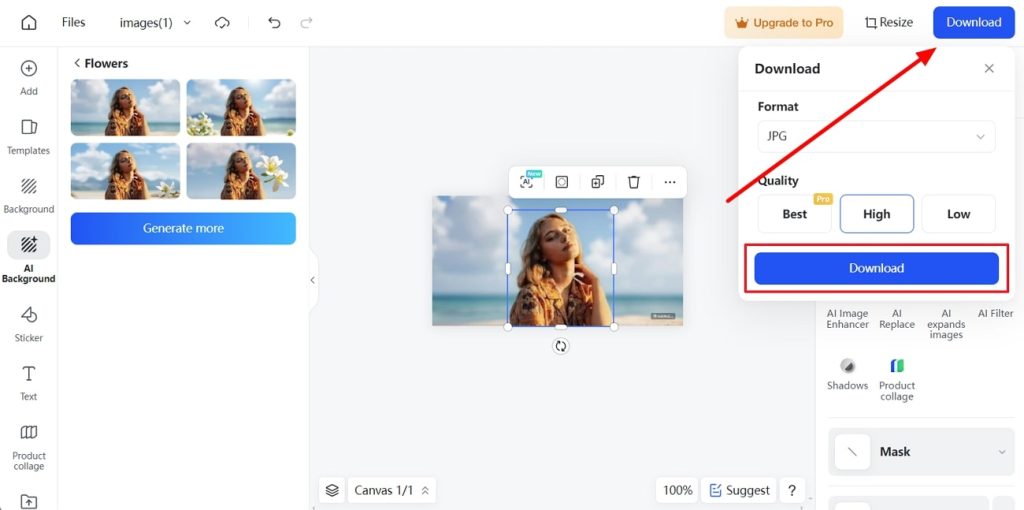
You can use the “AI Background” section from the top left panel and generate new backgrounds with AI. From there, you can consult the “For you” section, where AI has generated a background according to the image. By hitting on one, changes can be observed in the main image with the more similar ideas on the left side.
Step 4. Download the Results When Processing Concludes
After adding the AI-generated background or eliminating the existing one, go to the top-right side. Next, click the “Download” button to expand a drop-down menu with “Format” and “Quality” selection options. Later, the “Download” button in the drop-down menu will help you export the image into your system.
Part 3. Additional AI Capabilities of insMind: Beyond the Background Remover
insMind isn’t limited to removing backgrounds and changing them, as it comes with diverse AI abilities to enhance the overall quality of your image. Let’s uncover them to realize the effectiveness of insMind in enhancing the appearance of a photo:
- AI Filter: If you are tired of posting the same dull and boring portraits on social media, you must try this tool of insMind. It can transform your images into a creative art piece through line art, comics, watercolor, oil painting, or 3D filters.
- AI Shadow: Advertising companies try their best to get an appealing product image to attract the most customers. For them, the AI Shadow feature is a game changer which can add desired level of shadow on the product to bring authentication element in them.
- AI Magic Eraser: If your team has captured images of two products in one frame, but you wish to market two of them separately. In that case, you can use the Magic Eraser tool to remove one product from the frame without recapturing it.
- AI Image Enhancer: People of this age are addicted to seeing high-end images, but managing the quality of older images gets difficult. For this purpose, insMind introduces an image enhancer that can eliminate image noise and grains to craft high-definition images.
- AI Expand: With cutting-edge technology, this software features an AI Expand tool that can expand the visuals of an image to fit with the layout. It is especially useful for content creators who can post images on various platforms without stretching or cropping them manually.
Part 4. How is AI Background Remover Beneficial to Everyone?
The integration of AI in background removal has opened gates for a new era of efficiency and accessibility, which is yet unknown to many individuals. Before you are ready to go and utilize AI background removers, take a glance at its benefits to better understand this dimension:
- Time Efficiency: The significant improvement in AI background removers is the amount of time compared with the manual methods, which have been squeezed into seconds.
- Consistency and Precision: AI ensures uniformity of background removal and aims to provide precise results regardless of the complexity of the provided image.
- Ease of Use: Such tools are designed with simplicity in mind, requiring little or no prior knowledge of image processing for everyone’s ease of use.
- Cost-effectiveness: Instead of hiring professionals and buying subscriptions to advanced software, remove BG tools are often free or cheap for every photo editor.
Conclusion
In short, AI integration in image editing has changed the old, time-consuming techniques of enhancing images. Now, AI background removers like insMind have introduced effortless background removal and changing for the ease of professionals and newbies. To market your services in products or portraits, you must consult insMind and utilize its diverse abilities online.
