
Nowadays, dynamic visualization has become more and more prevalent throughout the whole world, which is an easy and clear way to show people’s ideas and thoughts, quickly transmit information, and more. We can see various video editing platforms come to us with different types and orientations. In this case, as an outstanding video editing platform, Clipfly has become a perfect choice for you to use. Its one-stop video editing platform and intelligent AI technology have become integral in streamlining the video creation process.
This article will be divided into three parts. The first part briefly introduces Clipfly and its main features and tools, trying to figure out who is suitable for using it. The second part gives you a more intuitive experience through the actual operation on how to perform one-stop video editing on Clipfly. The last part is to show you the pricing of Clipfly and the questions people would ask. I really hope my review can help any of you.
What is Clipfly and its main features?
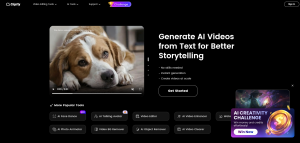
Clipfly is an online video editing platform that integrates all functions from video idea generation to final video export, allowing users to complete the entire video production process without switching between different tools, and its AI-driven video generator can support converting text or static images into animated videos, providing users with more creative possibilities and inspiration. Moreover, it boasts an abundant library of resources, including various effects, filters, and music, along with exclusive video templates and styles tailored to different platform standards to meet users’ personalized video creation requirements. How convenient and efficient a Clipfly platform is, I think!
Pros and Cons:
⭕The unique one-stop video editing service.
⭕Intelligent and efficient AI-driven video generating,
⭕One-click enhancement and beautification.
⭕High-quality video export.
⭕User-friendly interface design and easy to use for beginners.
⭕Diverse functions and tools for users to choose from.
❌Tools and functions can continue to be updated and optimized.
❌AI-generated videos are sometimes not stable and realistic.
Who is suitable for Clipfly?
Video creator: Users who need to fast make and edit videos to finish their work or post their videos on social media such as bloggers, producers, social media influencers, and more.
Business user: Users who need to conduct brand marketing and attract users by making high-quality video content such as enterprises. And the individual workers who need to accomplish their tasks and achieve goals through video content.
Personal user: Users who are beginners of video editing, not professional but fond of it, trying to create videos to study and satisfy themselves.
Basic Tools:
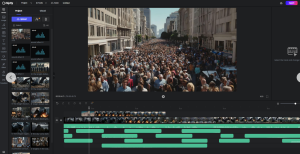
As an online one-stop video editing platform, Clipfly offers users the most clear and friendly interface, making it easy to use and operate. While editing videos, you don’t have to switch between different tools, everything is just in one stop, you can effortlessly use the basic functions of video editing including clipping, cropping, adding text, music, transition effects, filters, rotating, and merging, among others.There is a vast library of materials including filters, fonts, stickers, effects, videos, and image materials, to meet your personalized needs.
Unique features:
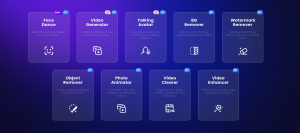
Apart from its foundational video capabilities, Clipfly, a powerful AI-driven video editing platform, effectively incorporates AI technology into video editing. This includes features such as one-click video enhancement and beautification, one-click watermark or background removal, and more.
Beyond its traditional functions, Clipfly, empowered by AI technology, has grabbed the trend of the developing era and has launched numerous interesting and highly creative functions. For example:
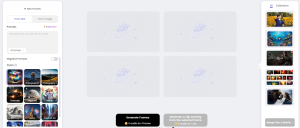
AI video generator: You can generate a video from text or static images. (The picture above.)
AI face dance: Upload our portrait images to bring them to life and dance.
AI Talking Avatar Generator: Turn your stationary portrait into a realistic AI talking character,
and it can also convert the text to lifelike human speech.
There are additional tools and functions not mentioned in this review article including AI video Clearer, AI video enhancer, video background remover, and more. Moreover, we can see that the whole platform is still continuously extending, updating and optimizing its functions and tools.
How to video edit in one stop?
Step 1: Sign in.
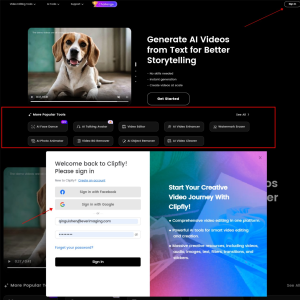
You can see from the picture above. On the homepage, you can directly choose and click the tools you need, but you need to sign in first with your Facebook, or Google account or recreate a new account.
Step 2: Upload your video and edit.
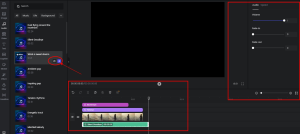
As you can see, you can upload new videos, use text-to-speech, or the video you uploaded before from the Cloud. You can find the corresponding section and add the content you need to your video. And you can also bookmark your favorite materials.
After adding all the content you want, you can see the operation panel, and you can make corresponding adjustments and modifications in the respective sections.
You can adjust your video in basic ways following your needs.
Step 3: Export your video.
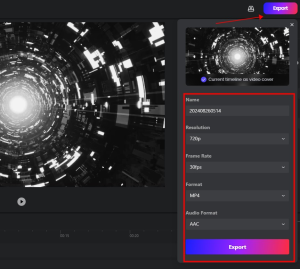
Click the export button. You can modify the name and choose the video format based on your needs. It supports 480p, 720p, 1080p, 2K, 4K for high quality export.
Step 4: Enhance and beautify your video with AI tools.
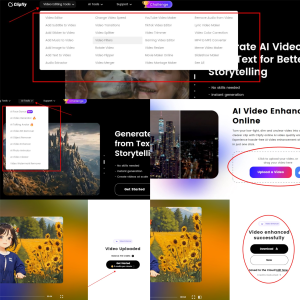
You can edit your videos in a more detailed and specific manner with AI. Whether it’s cropping, enhancing, background removal, or watermark removal, all of these operations can be finished with just one click. All the operations are extremely straightforward, requiring no complicated steps. Simply upload your video, and AI will automatically adjust and enhance it for you with just one click.
What is the price?
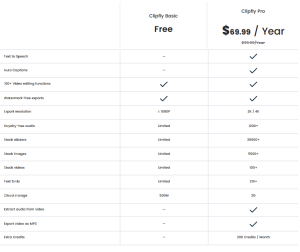
As you can see, basic tools are free forever, professional plan starts at $69.99/year and credit plans are offered to every user.
Conclusion:
According to this article, we can now gain a clearer understanding of Clipfly, a one-stop video editing platform that offers video editors a more convenient and efficient way to generate and edit videos, providing users with a richer video editing experience. I hope my review will be of great help to you.
Frequently Asked Questions:
1. Can I use Clipfly free online?
Yes, you can use Clipfly free online anytime and anywhere, but some of its advanced functions and materials still need to be charged.
2. What is one-stop video editing?
It means you don’t have to switch different tool interfaces while editing videos, which reduces some unnecessary steps and hassles.
3. Can Clipfly ensure user’s privacy and safety?
Clipfly owns a whole intact policy to guarantee users’ privacy, including portrait rights, personal information, and other rights. It also tries to protect users from any safety problems from the Internet.
