
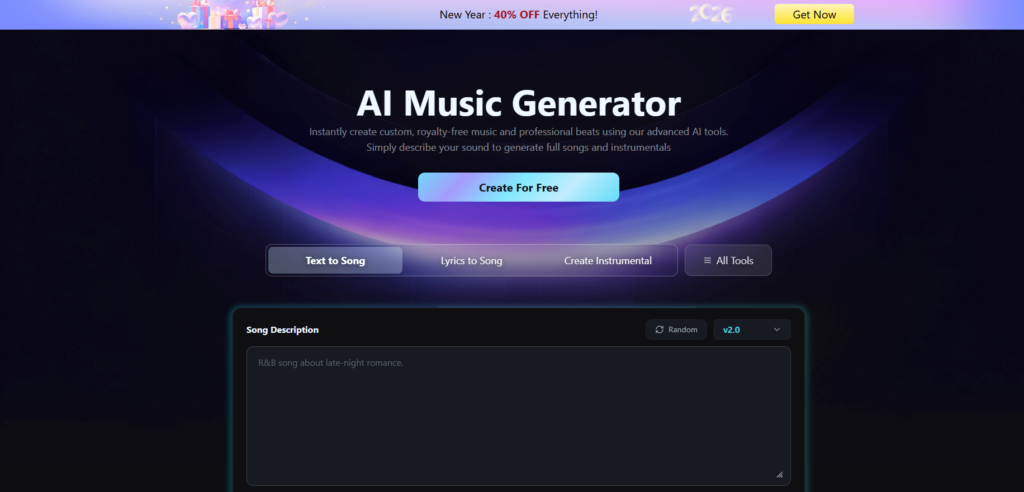
GenerateAIMusic has won the favor of numerous music lovers and new creators shortly after its launch, thanks to its user-friendly operation and abundant creative possibilities. Yet for first-time users, insufficient understanding of the tool’s functional logic and creative parameter settings often leads them into pitfalls during practice. This not only reduces creative efficiency but also undermines creative motivation.
To help newcomers get started quickly and embark on a smooth creative journey, we will focus on practical scenarios to sort out and break down the three most common pitfalls for new GenerateAIMusic users. These include vague text descriptions causing the track to deviate from expectations, illogical instrument combinations resulting in a disorganized sound, and incorrect export format selection affecting subsequent use. Targeted tips are provided alongside to help newcomers avoid risks accurately and master AI music creation skills efficiently.
Text To Song: Description Tips for Newbies to Make Tracks Quickly
Turn your text descriptions into high-quality songs in 60 seconds with our AI text-to-music generator. You can directly enter a brief description of your song. The AI music generator then automatically handles the entire creative process from melody generation and arrangement to final mastering.
Operation Steps:
1. Fill in Song Description accurately. The more specific the description, the more tailored the result. Clarify 4 key dimensions in the input box.
- Clarify 4 key dimensions in the input box: Genre + Theme
- Follow the example R&B song about late-night romance to directly lock the genre and core theme
- Instruments + Tones: Add details such as an R&B song about late-night romance with soft piano and smooth saxophone
- Mood + Tempo: Include atmosphere descriptions like slow-tempo, warm, and intimate
- Structure Notes: Add with verse-chorus structure if a complete track is needed
2. Make good use of interface tools to support your creation.
- Random button: Click it to generate random sample descriptions when you lack inspiration. You can use them directly or modify them as needed.
- Version Selection (v2.0): Prioritize newer versions for more accurate genre matching and enhanced audio quality.
Lyrics to Song: Practical Tips for Matching Lyrics to Genre
GenerateAIMusic not only offers a practical text-to-music function but also comes with a dedicated lyrics-to-music feature to meet diverse creative needs. If you have already written lyrics but struggle to choose a genre or cannot convey the emotions and stories in the lyrics through melody, this feature is the perfect solution for you. But how to make the most of it to match lyrics to genre? Here are the steps to follow:
1. Lyrics input: Provide complete lyrics with a clear structure to help AI grasp the rhythm better
Do not just enter scattered sentences in the Lyrics input box
- Enter the full lyrics, including verses and choruses, and use line breaks to separate sections.
- If there are repeated sections in the lyrics, mark them as [Chorus Repeat] to help the AI match the recurring melody and rhythm.
2. Genre matching: Double assurance with keywords and preset tags
- In the Style section, avoid vague descriptions and define precisely.
- Manually enter the core genre.
- For lyrical lyrics, write soft pop with a warm melody.
- Pair with preset tags.
- There are tags like synth pop and hip-hop soul at the bottom of the interface. Click 1 to 2 tags that match the lyrics’ vibe.
- Click the Random button when uninspired. Refer to the randomly generated genre combinations and adjust to fit the lyrics.
3. Detail adaptation: align vocals and theme with lyrics
- Vocal Gender: Choose vocal gender based on lyric mood. Opt for female for delicate confession lyrics and male for calm narrative lyrics.
- Expand Advanced Options: Subsequently, adjust tempo and instrument balance to further align the musical style with the emotional tone of the lyrics.
Create Instrumental: Instrument selection for different usage scenarios
If you prefer music without lyrics, GenerateAIMusic also meets your needs for different scenarios in the instrumental music field. Please check the following instructions for specific operations
Basic operation logic: Genre description plus tag combination
- Style input box: focus on the three core elements of genre, mood, and instruments. Refer to the example Classical piano piece evoking calm and reflection
- Tag support: click preset tags at the bottom of the interface, such as diminished chords and synth transitions, to enhance style details
- The title is optional to help AI capture the thematic atmosphere
Scene-specific adaptation tips
- Scene 1: Mellow ambient background music for reading or meditation
Style description: Write Soft ambient instrumental with gentle piano arpeggios, slow tempo, and warm pad layers
Tag matching: Select spring and avoid intense tags like modern rock
Effect: Generate mellow background music with no abrupt changes - Scene 2: Film and drama BGM for suspense scenes
Style description: Write a tense instrumental with a minor key, subtle string swells, and distant percussion, building gradually
Tag matching: Select diminished chords and dark experimental drum and bass
Effect: Background music that fits the plot rhythm with emotional dynamics - Scene 3: Instrument practice accompaniment for acoustic guitar, vocal accompaniment
Style description: Write a simple acoustic guitar backing track, medium tempo, clear chord progression, no dominant lead instruments
Tag matching: Do not select complex tags and keep the style concise
Effect: Stable accompaniment rhythm with prominent chord structure for easy practice
FAQs for Beginners
Is there a free AI music generator?
Yes! GenerateAIMusic offers a free AI music generator with 6 credits daily – enough to create approximately 2 songs per day. No credit card required, no sign-up fees. You can upgrade to paid plans anytime for more credits, longer songs (up to 8 minutes), and commercial licensing.
Do my credits expire?
Yes, credits have expiration periods. Paid subscription credits are valid during your subscription period. For annual plans, credits are distributed monthly over 12 months. Check your Account – Remaining Credits page for detailed expiration information.
Is AI-generated music copyrighted?
Music created with GenerateAIMusic is royalty-free for paid subscribers. You own the output and can use it without ongoing royalty payments. Our AI generates original compositions, not copies of existing songs, ensuring your music is unique and legally safe for commercial use with a valid subscription.
Summary
The above is a complete beginner’s guide to using GenerateAIMusic, covering pitfalls to avoid and step-by-step instructions. It includes core mistake prevention and full scenario adaptation for the three key functions, providing all-around support for beginners to get started smoothly. Clear and easy-to-follow tips are available for text-to-song, lyrics-to-genre matching, and instrumental music creation, accurately solving common issues such as vague descriptions, mismatched styles, and poor scene adaptation while balancing practicality and professionalism. The tool is easy to operate with ample creative space, allowing users to generate music quickly without complex foundational knowledge, meeting diverse needs like daily creation, scene background music, and instrument practice accompaniment. Beginners can follow the tutorial as needed to avoid various mistakes, efficiently unlock the fun of AI music creation, and start their exclusive creative music journey now.
