
Is your cloud bill bleeding profit? You are not alone. Research shows companies waste nearly 30% of their cloud spend on resources they don’t even use.
Imagine paying for an empty office building every month; that is what idle AWS resources do to your bottom line. One startup recently woke up to a surprise $80,000 bill because of a simple configuration error.
That is the reality of unmanaged cloud growth. This blog explains exactly how to stop the waste and use Costimizer to turn cloud spending into a competitive advantage.
Why Your AWS Bill is a Black Box?
You cannot manage what you cannot see. Most CFOs look at an AWS invoice and see a single, massive line item that grows every month.
You ask, “Why is this higher?” and the engineering team says, “We scaled.” And now you have no way to verify if that spending drove revenue or if we just wasted cash.
This happens because AWS bills are technical, not financial. They list thousands of “instance hours” and “data transfer GBs” rather than “Customer Onboarding Costs” or “R&D Spend.”
Why does this happen?
Cloud computing is variable. Unlike a fixed server lease, AWS charges for every second a resource runs. Engineers prioritize speed and uptime.
They often provision powerful servers “just to be safe” or forget to turn off test environments. Without a guardrail, this decentralized spending creates a disconnect between the people spending the money (engineers) and the people managing it (finance).
This is exactly why a purpose-built AWS cost management tool becomes critical for modern finance teams.
Here is the solution Costimizer provides:
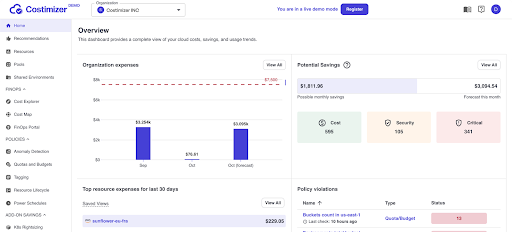
Costimizer bridges this gap between visibility and accountability. It connects to your AWS account and translates technical jargon into business metrics.
What you get: A simple dashboard that shows exactly who spent what.
Benefit: You can point to a specific project and say, “This cost went up 20%, but user growth is flat. Why?”
Real-World Example: A SaaS company using Costimizer identified that 15% of their bill was for “Snapshots” (backups) of databases that had been deleted months ago. They clicked one button to remove them and saved thousands instantly.
How to Stop the Bleeding?
Very often, surprise Bills Destroy Budgets. A developer accidentally leaves a high-performance database running over the weekend. Or a script malfunctions and downloads terabytes of data. You only find out 30 days later when the invoice arrives. By then, the cash is gone.
Tools like Costimizer act like a 24/7 security guard for your budget. It uses AI to learn your normal spending patterns. If spending spikes, even by a small margin, it alerts you immediately.
How it works: The AI agents monitor usage every hour. If a $5/day server suddenly costs $500/day, the system flags it. On top of it all, it watches specific services.
If your storage costs spike but compute stays flat, it knows that is unusual and alerts the right team member.
Benefit: You catch mistakes in hours, not weeks. This prevents bill shock and keeps the monthly variance low.
How to Cut Costs Safely?
The Problem is very simple: when Finance suggests cutting costs, Engineering fears downtime. As a result, companies pay for Zombie Resources, servers that run 24/7 but do zero work.
Here is the fix: Costimizer analyzes the actual utilization of every resource. It provides evidence, not opinions.
This tool also provides evidence like “ this server has used only 2% of its CPU for the last 90 days.”
And it can either be done after your confirmation, or the system will recommend you to Rightsizing, moving to a smaller, cheaper server that handles the workload perfectly.
Benefit: Engineers trust the data because it proves performance won’t suffer. Finance gets the savings.
Specific Opportunity: Costimizer specifically targets AWS RDS (database) costs. It identifies opportunities to move to newer, cheaper processor types (like Graviton), which can offer up to 40% better price performance without changing application logic.
Manage Cost By Group Discount
AWS offers discounts if you commit to spending a certain amount for 1 or 3 years (Reserved Instances or Savings Plans).
But committing is risky. If you commit to $50k/month and your usage drops to $30k, you still owe AWS $50k. Most CFOs hate this liability.
This is where Costimizer helps: Costimizer uses Group Buying. It aggregates the usage of multiple customers to negotiate enterprise-level discounts.
- How it works: You get the benefit of a massive volume commitment without taking the risk yourself. Costimizer manages the pool.
- Benefit: You instantly lower unit costs by 20-30% without signing a long-term lock-in contract with AWS.
- ROI: This is pure bottom-line profit. The software often pays for itself within the first month just from these rate reductions.
How to Measure the ROI of the AWS Cost Management Tool?
You might be asking if the tool is worth the cost or not.
Let’s look at the math for a company spending $50,000 monthly on AWS.
- Waste Reduction: Industry average waste is 30%. Identifying and removing zombie resources saves approx $15,000/month.
- Rate Optimization: Group buying and rightsizing typically save another 15-20%. That is approx $7,500/month.
- Engineering Time: Instead of a senior engineer ($150k/year salary) spending 5 hours a week manually checking bills, they spend 0 hours. Costimizer automates it.
Total Monthly Impact: Approx $22,500 in savings.
And this is just a fraction of the savings (Costimizer offers a free Growth plan and ROI-focused Enterprise tiers). The ROI is immediate and recurring.
Conclusion
You do not have to accept rising cloud costs as the “cost of doing business.” The complexity of AWS is manageable if you have the right lens. Costimizer gives you that lens.
It provides the visibility to hold teams accountable, the AI safety net to prevent disasters, and the buying power to lower rates instantly.
Take the next step and start controlling the source. Visit Costimizer to connect your account and see your potential savings.
