
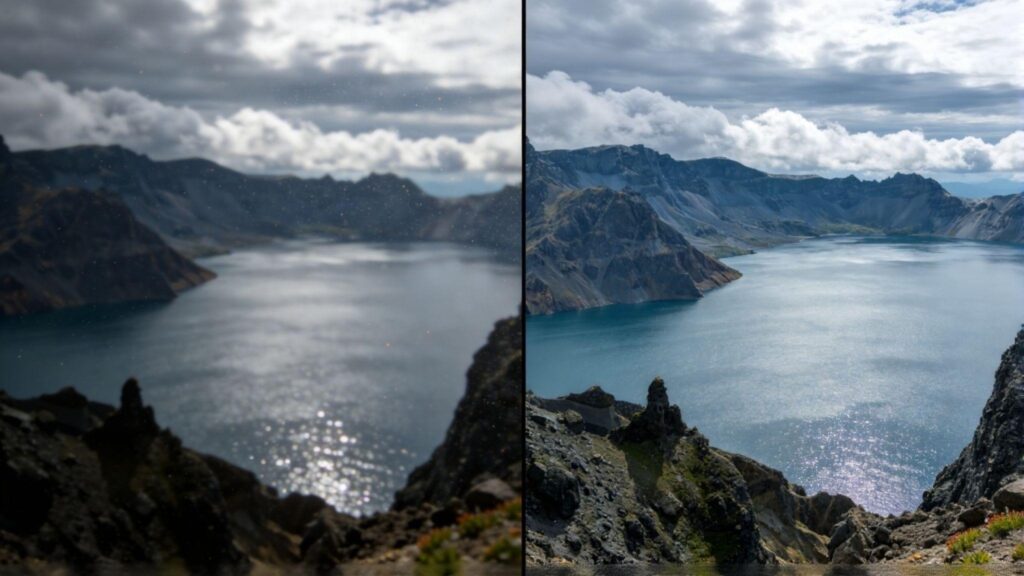
Smartphone cameras are incredible tools for capturing detailed macro photos, but they often fall short. When you zoom in, you lose sharpness, and the fine details turn to mush. This is where AI image enhancement tools come in. They promise to rescue your blurry shots, but which one performs best for the unique challenges of macro photography? We’re putting two popular options to the test: ImageUpscaler.ai and Topaz Gigapixel AI.
This comparison will break down how each tool handles upscaling intricate details from smartphone macro images. We’ll look at everything from ease of use and features to the final image quality. An effective Image Upscaler should be able to intelligently add detail without creating artificial-looking textures. Let’s see which tool gives your close-up shots the clarity they deserve.
Both platforms offer powerful technology, but they are built for very different users. One is a fast, web-based tool perfect for quick enhancements, while the other is a robust desktop application for professional workflows. As a complete AI Photo Editor, a good tool needs to balance power with accessibility. By the end, you’ll know exactly which upscaler is the right fit for your macro photography needs.
ImageUpscaler.ai: The Accessible Enhancer
ImageUpscaler.ai is a browser-based tool designed for speed and simplicity. It uses advanced AI algorithms to enlarge photos up to 4x their original size while enhancing details and reducing noise. Its main appeal is its accessibility; there’s no software to download, and the process is straightforward enough for anyone to use, regardless of their technical skill.
For smartphone macro photographers, this means you can quickly upload a slightly blurry shot of an insect or flower and get a sharper, larger version in seconds. The platform handles the complex processing on its servers, delivering a clean result without requiring a powerful computer on your end. It focuses on a streamlined user experience, making it a go-to for hobbyists and social media creators who need quality results without a steep learning curve.
Key Features
ImageUpscaler.ai keeps its feature set focused on its core purpose: making your images better with minimal effort. The AI models are trained to recognize common subjects like faces, objects, and natural textures, allowing them to intelligently add detail where it matters most. For macro shots, this means the AI can often distinguish between the delicate texture of a petal and unwanted digital noise, enhancing one while removing the other. It also includes automatic noise reduction, which is crucial for smartphone photos taken in less-than-ideal lighting.
Pros & Cons
Pros:
* Extremely easy to use with a simple drag-and-drop interface.
* Fully web-based, requiring no software installation or powerful hardware.
* Fast processing times for quick turnarounds.
* Offers a free tier for users to test the service.
Cons:
* Fewer manual controls compared to dedicated desktop software.
* Maximum upscale is limited to 4x the original size.
* Requires an internet connection to use.
Best For
ImageUpscaler.ai is perfect for amateur photographers, social media managers, and anyone who needs to quickly improve their smartphone macro shots without getting bogged down in technical settings. If you want a fast, reliable tool to make your close-up photos pop before posting them online, this is an excellent choice.
Topaz Gigapixel AI: The Professional’s Toolkit
Topaz Gigapixel AI is a heavyweight in the world of image enhancement. It is a standalone desktop application that has earned a reputation among professional photographers for its incredible detail recovery and powerful AI models. Unlike web-based tools, Gigapixel processes images locally on your computer, leveraging your machine’s hardware to perform complex calculations.
This tool gives you granular control over the upscaling process. You can choose from several specialized AI models, including “Standard,” “Lines,” “Art & CG,” and “Low Resolution,” to match the specific needs of your image. For macro photography, this means you can experiment to see which model best reconstructs the fine textures of a subject. Gigapixel also allows you to upscale images by up to 600%, offering a level of enlargement that few other tools can match.
Key Features
Gigapixel’s strength lies in its advanced AI and user controls. The software includes sliders to manually adjust noise suppression and blur removal, giving you the final say on the output. Its “Face Recovery” model is also surprisingly effective on non-human subjects, often improving detail in the eyes of insects or animals. The ability to batch process entire folders of images makes it a massive time-saver for photographers working with large volumes of photos from a shoot.
Pros & Cons
Pros:
* Exceptional detail enhancement and artifact removal.
* Offers multiple AI models for different types of images.
* Allows for upscaling up to 6x the original resolution.
* Provides manual sliders for fine-tuning the results.
Cons:
* Requires a one-time purchase, which can be expensive.
* Needs a powerful computer with a good graphics card for best performance.
* Has a steeper learning curve than browser-based tools.
Best For
Topaz Gigapixel AI is built for professional photographers, serious hobbyists, and anyone who needs the highest possible quality and control for print or large-format digital use. If your goal is to create stunning, poster-sized prints from your smartphone macro shots and you have a capable computer, Gigapixel is the industry standard.
Side-by-Side Comparison Summary
When choosing between ImageUpscaler.ai and Topaz Gigapixel AI, the best option depends entirely on your needs, budget, and technical expertise. Here is a direct comparison of their key attributes.
| Feature | ImageUpscaler.ai | Topaz Gigapixel AI |
| Platform | Web-Based | Desktop Software |
| Ease of Use | Very Easy | Moderate Learning Curve |
| Best For | Quick Edits, Social Media | Professional, Print |
| Upscale Limit | 400% (4x) | 600% (6x) |
| Manual Controls | Limited | Extensive |
| AI Models | General-purpose AI | Multiple Specialized Models |
| Processing | Cloud-Based | Local Computer |
| Pricing | Freemium & Subscription | One-Time Purchase |
Detail Recovery and Quality
For smartphone macro photography, detail is everything. Topaz Gigapixel AI often has an edge here due to its specialized AI models and manual controls. You can fine-tune the settings to recover faint textures in a flower petal or the compound eye of a fly. However, ImageUpscaler.ai delivers impressively clean and detailed results with zero effort, making it a strong contender. Its AI is excellent at producing natural-looking enhancements that are perfect for digital viewing.
Accessibility and Workflow
This is where the two tools differ the most. ImageUpscaler.ai is the clear winner for accessibility. You can use it on any computer with an internet connection, making it ideal for editing on the go. Its simple workflow takes just a few clicks. Gigapixel AI requires a software installation and a reasonably powerful computer. Its workflow is more involved, but it integrates well with other editing software like Adobe Lightroom and Photoshop, which is a major plus for professionals.
Pricing Model
ImageUpscaler.ai operates on a freemium and subscription model. You can process a few images for free, and if you need more, you can subscribe to a monthly or annual plan. This is great for users who have occasional needs. Topaz Gigapixel AI is a one-time purchase. While the upfront cost is higher, you own the software forever, which can be more cost-effective in the long run for heavy users.
Final Recommendation
So, which AI upscaler should you choose for your smartphone macro photos? The decision comes down to your primary goal.
Choose ImageUpscaler.ai if: You are a hobbyist, social media creator, or anyone who values speed and convenience. You want to quickly enhance your macro shots for digital sharing without a complicated process or a large financial investment. Its web-based platform makes it incredibly accessible, and the results are more than enough to impress your audience online.
Choose Topaz Gigapixel AI if: You are a professional photographer, a serious enthusiast who prints their work, or someone who demands the absolute highest level of detail and control. You have a capable computer and are willing to invest time and money to achieve pristine, print-ready images. Its powerful features and specialized AI models provide a level of quality that is hard to beat for professional applications.
Ultimately, both tools are excellent at what they do. ImageUpscaler.ai democratizes AI photo enhancement, making it available to everyone, while Topaz Gigapixel AI provides the power and precision that professionals require.
