
Mac users, especially those switching from Windows, often wonder how to efficiently manage files on their new operating system. While Windows uses File Explorer as its primary tool for navigating files, macOS relies on Finder as the default file management application. Finder functions similarly to file explorer mac, enabling users to browse, organize, and manage their files.
However, if you’re looking for alternatives or enhanced functionalities, third-party software options like Commander One can provide even more flexibility. In this guide, we’ll explore how to open Finder, introduce alternative software, and offer tips to optimize your file management on a Mac.
What Is Finder on Mac?
Finder is the backbone of file management in macOS. It helps users browse files, launch apps, and manage storage. When you open Finder, you’ll see a user-friendly interface for accessing files, folders, applications, and external drives like USBs or hard drives. Essentially, Finder acts as the Mac equivalent of Windows’ File Explorer.
For users accustomed to File Explorer, Finder offers many of the same functionalities, with added features to enhance the macOS experience. However, for those seeking even more advanced file management tools, alternatives such as Commander One can provide dual-pane navigation, FTP client integration, and more.
How to Open Finder on Mac
Opening Finder is straightforward, and there are several methods depending on your preference:
- Using the Dock
- The Finder icon—a blue-and-white smiling face—is located on the left side of the Dock by default. Click it to open a new Finder window.
- Using Spotlight Search
- Press Command + Spaceto open Spotlight, type “Finder,” and press Enter.
- Using the Desktop
- Right-click (or Control + click) on any empty desktop space, and select New Finder Window.
- Using the Keyboard Shortcut
- By default, pressing Command + Nopens a new Finder window if Finder is active.
Third-Party File Management Tools
While Finder is powerful, some users may need additional features for their workflow. Here are a couple of popular alternatives to Finder that offer more advanced functionalities:
1. Commander One
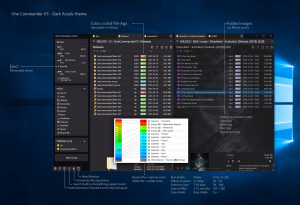
- Commander Oneis a versatile file manager for Mac that features a dual-pane interface, making it easier to manage and organize files between different folders or drives. It supports FTP connections, integrates with cloud storage services like Dropbox and Google Drive, and provides customizable hotkeys for efficiency.
- To open Commander One:
- Download and install Commander One from the official website.
- Launch it from your Applications folder or use Spotlight by typing “Commander One.”
- Commander Oneoffers more control over file management, particularly for power users who need advanced features.
2. Path Finder
- Another popular alternative is Path Finder, which extends Finder’s functionalities with dual-pane views, file tagging, and direct access to hidden files.
- To open Path Finder:
- Download it from the developer’s website.
- Open it via your Applications folder.
Navigating Finder: Understanding the Basics
Once you’ve opened Finder, understanding its interface helps you manage files more effectively.
- Sidebar: Quick access to important locations such as Desktop, Documents, Downloads, and external drives.
- Toolbar: Contains navigation buttons, view options, and a search bar.
- View Options: Customize file display as icons, lists, columns, or galleries.
Finder vs. File Explorer: Key Differences
Transitioning from Windows to macOS brings a few differences between Finder and File Explorer:
- Clean Interface: Finder’s minimalistic design offers an easy-to-navigate interface, while File Explorer often displays more toolbars.
- Tabs and Tags: Finder allows users to open multiple tabs and assign color-coded tags to files for better organization.
- Integration: Finder seamlessly integrates with macOS features like iCloud Drive, Airdrop, and Spotlight.
Tips for Efficient File Management with Finder and Alternatives
To improve file management on macOS, whether using Finder or third-party tools like Commander One, consider these tips:
- Smart Folders: Organize files based on criteria like file type or date modified.
- Quick Look: Press Spacebar to preview a file without opening it.
- Batch Rename: Rename multiple files at once by selecting them, right-clicking, and choosing Rename.
Conclusion
While Finder is the default file management tool on macOS, alternatives like Commander One and Path Finder offer additional functionality for users needing more control over their file systems. Whether you’re opening Finder through the Dock, using a keyboard shortcut, or exploring third-party options, managing files on Mac is intuitive and flexible.
For more tips on macOS and third-party software, including Commander One, visit our blog and explore our in-depth guides on how to optimize your Mac experience.
