
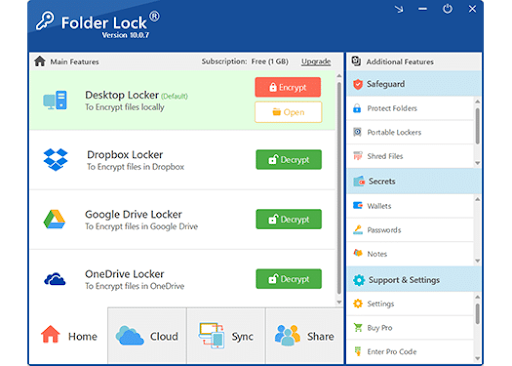
Short answer: If you want fast, user-friendly protection that goes beyond simple “hide” tricks, Folder Lock [https://www.newsoftwares.net/folderlock/] is the most complete Windows privacy suite in its class. It locks folders instantly, creates AES-encrypted “Lockers,” secures USBs, backs up encrypted data to the cloud, shreds files, cleans history, and even runs in stealth. For most people—students, professionals, small businesses—Folder Lock covers more real-world use cases with fewer steps than stitching together multiple free tools.
Who this review is for
- Windows 10/11 users who need practical file/folder protection without command lines.
- Freelancers & small teams sharing machines or carrying data n USBs.
- Travelers & remote workers who need solid on-the-go security.
- Creators & consultants handling client files, quotes, photos, legal docs.
What Folder Lock actually does (and why it matters)
- Lock Files: Hides/locks files and folders instantly from Windows Explorer. Quick privacy on shared PCs.
- Encrypt Files (Lockers): Creates encrypted containers (“Lockers”) with strong AES encryption. This is real, at-rest protection that survives drive theft.
- Secure Backup: Backs up encrypted Lockers to the cloud so your off-site copy stays encrypted end-to-end.
- Protect USB/CD: Moves encrypted Lockers to a USB drive or burns to discs. Keeps data safe even if the media is lost.
- Shred Files + Clean History: Overwrites discarded data so it can’t be recovered, and wipes traces like temp files and recent lists.
- Stealth Mode + Hack Security: Hides the app shortcuts, scrambles launch hotkeys, and bans brute-force attempts after failures.
- Wallets/Password Vault: Stores cards, IDs, and credentials in encrypted form.
Why this set matters: Locking alone is not encryption. Plenty of “folder locker” tricks simply modify permissions or hide folders; they can fail when you boot from another OS or pull the drive. Folder Lock’s encrypted Lockers and shredder address the real risks: device theft, data recovery, and leaks through removable media—not just nosy coworkers.
Tutorial: First-time setup (5 minutes)
- Install and launch Folder Lock.
- Create a master password. Use at least 12 characters with letters, numbers, and symbols. Write it down and store it away from the PC (never inside the same machine).
- Pick a secure location (ideally a non-synced local folder) for your first Locker.
- Enable Hack Security (failed login lockouts) and Stealth Mode if you share the PC.
You’re ready to protect data using one or more methods below.
Method 1: Lock a folder for instant privacy (fastest)
Best for: Quick “keep out” protection on a shared PC.
- Open Lock Files.
- Add the folder you want to lock (drag-and-drop or “Add” button).
- Toggle Lock/Hide to ON.
What you get: The folder disappears from Explorer and becomes inaccessible without Folder Lock.
Good to know: This is privacy, not full cryptography. It blocks casual snooping and standard user accounts but doesn’t protect if someone boots another OS and browses the drive sectors. For strong security, use Method 2.
Troubleshooting
- Folder still visible? Restart Explorer (or the PC). Check if your user has admin overrides.
- Cloud sync shows errors? Disable sync for the locked folder or exclude it—sync apps struggle with hidden handles.
Method 2: Create an encrypted Locker (strong security)
Best for: Sensitive projects, financial docs, client archives.
- Open Encrypt Files.
- Click Create Locker and choose size:
- Dynamic (recommended): Grows as needed; saves space.
- Fixed: Slightly faster for very large sets; reserves the space up front.
- Dynamic (recommended): Grows as needed; saves space.
- Set a strong Locker password (different from master if you want separation of duties).
- Open/Mount the Locker. It appears like a drive letter.
- Move or save files into the Locker (drag-and-drop like any drive).
- Close/Lock the Locker when done.
What you get: AES-strength encryption at rest. If the laptop is stolen, the raw files remain unreadable.
Troubleshooting
- “Locker won’t open”: Check caps lock; verify you’re typing the Locker password, not the master. Some antivirus tools block virtual drive mounting—whitelist Folder Lock.
- “Out of space”: Resize a dynamic Locker from the app; for fixed, create a larger one and migrate.
- “Slow copy”: Large files + encryption can be CPU-heavy on older machines. Close heavy apps and keep Locker dynamic.
Method 3: Secure cloud backup of encrypted Lockers
Best for: Off-site disaster recovery without trusting the cloud provider.
- Keep your files inside a Locker.
- Open Secure Backup.
- Choose your Locker and turn on encrypted cloud backup.
- Set a strong cloud backup password (can match the Locker password if you understand the risk; separate is safer).
What you get: Your cloud copy is encrypted before it leaves your machine. If the provider is compromised, your data remains unintelligible.
Troubleshooting
- Sync conflicts? Only open one Locker at a time across devices. Close the Locker fully before the next machine syncs.
- Slow uploads? Use wired Ethernet overnight for first backup. After that, only deltas should sync.
Method 4: Protect USB drives and external disks
Best for: Consultants, students, photographers, and auditors carrying active projects on removable media.
- Open Protect USB/CD.
- Choose Copy Locker to USB or create a new portable Locker.
- Eject safely and test on another PC.
What you get: If the USB is lost, the data is still encrypted.
Troubleshooting
- “USB is full”: Use a dynamic Locker when possible, or reformat the drive to a filesystem that supports large files.
- “Can’t open on another PC”: Ensure the recipient runs Folder Lock (or uses the portable mode if offered by your build). Some corporate PCs block mounting virtual drives—coordinate with IT.
Method 5: Shred files and clean usage traces
Best for: Permanently deleting files that contain sensitive data.
- Open Shred Files.
- Drag files/folders you want to destroy.
- Choose overwrite passes (1–3 passes is enough for modern drives).
- Run shred.
- Open Clean History to wipe temp files, MRU lists, and recent docs.
What you get: Forensic-resistant deletion. Recycle Bin isn’t enough; shredding prevents recovery tools from bringing data back.
Troubleshooting
- Shred button greyed out? Make sure the file isn’t inside an open Locker. Close the Locker first.
- “File in use”: Close apps that might hold file handles (Word, Excel, previewers).
Method 6: Wallets and password vaults
Best for: Storing IDs, bank cards, software licenses, and logins away from plain text notes.
- Open Wallets/Password Vault.
- Create categories (IDs, cards, software keys).
- Add entries with fields and notes.
- Sync or back up the vault securely.
What you get: Sensitive records live inside encryption, not scattered across spreadsheets and emails.
Troubleshooting
- Can’t autofill? Keep Folder Lock updated and check browser integration guidance, or store credentials and copy manually into the target app.
Method 7: Stealth Mode and Hack Security
Best for: Shared or monitored PCs.
- Enable Stealth Mode to hide Folder Lock shortcuts and presence.
- Set a hotkey to launch it.
- Turn on Hack Security to auto-ban after failed logins.
What you get: Lower profile plus brute-force resistance.
Troubleshooting
- Forgot the hotkey? Launch the executable from its install directory. Keep your master password safe offline to avoid lockouts.
Why Folder Lock stands out: It’s a single workspace for locking, encrypting, backing up, porting to USB, shredding, and stealth. Most rivals do one or two of these; few offer the whole pipeline with a consistent UI.
Performance, reliability, and security notes
- CPU load: Encryption takes compute. On older CPUs, copying large video libraries into a Locker can feel slow. Let the initial move run; later edits are incremental.
- Dynamic vs fixed Lockers: Dynamic saves space and is easy to resize. Fixed can be slightly faster for massive static archives.
- Password hygiene: Treat the master password, Locker password, and cloud backup password as three distinct secrets. Store them in a physical notebook or a separate password manager.
- Key recovery: If you forget a Locker password, encrypted data is effectively unrecoverable by design. Avoid “clever” passphrases you’ll forget.
- Antivirus interactions: Encryption containers use virtual drivers. If your AV flags mounts, whitelist Folder Lock.
- Cloud sync order: Don’t keep a Locker open on two machines at once. Close it fully before opening elsewhere to avoid sync divergence.
- Windows updates: After major Windows upgrades, reboot twice if a Locker won’t mount; then reinstall or repair Folder Lock if drivers need refreshing.
Pros and cons
Pros
- All-in-one suite: lock, encrypt, backup, USB, shred, stealth, wallets.
- Friendly UI with quick workflows for non-experts.
- Dynamic Lockers conserve disk space and scale with your needs.
- Cloud backup keeps encryption end-to-end.
- Stealth and hack-protection options for shared PCs.
Cons
- Encryption adds overhead for huge media libraries during first import.
- Admin-restricted corporate PCs can block driver mounts (coordinate with IT).
Why Folder Lock is the best “practical security” choice for most users
Coverage: It handles the full lifecycle—create → use → carry → back up → retire—without making you juggle 4–6 separate tools.
Correct defaults: It leads users toward encryption, not just hiding, and pairs it with shredding so leftovers don’t leak.
Portability: USB-ready Lockers keep consultants, students, and photographers safe in the wild.
Stealth + ban protection: Many lockers forget the human factor (shared PCs and guessing). Folder Lock bakes in both.
Lower cognitive load: The fastest security is the one you’ll actually use. Folder Lock replaces scattered hacks with a single, repeatable workflow.
FAQs
1) Is locking the same as encrypting in Folder Lock?
No. Locking hides and restricts access inside Windows. Encrypting puts files inside an AES-protected Locker that remains unreadable even if someone removes your drive.
2) Can I open my Locker on another PC without installing the full app?
Yes, if you create a portable Locker on a USB using the Protect USB feature. Some corporate PCs still restrict mounts; coordinate with IT.
3) What happens if I forget my Locker password?
Encrypted Lockers are designed to be unrecoverable without the password. Keep an offline, physical record of credentials in a safe place.
4) Will encryption slow down my PC?
Initial moves of large files can be CPU-intensive, especially on older hardware. After that, day-to-day use is usually smooth, particularly with dynamic Lockers.
5) Is cloud backup safe if someone hacks my cloud account?
If you use Folder Lock’s Secure Backup with encryption, your data remains encrypted before upload. The attacker may see the file exists but not its contents.
6) Should I use dynamic or fixed Locker size?
Dynamic for most people—it grows as you add files. Choose fixed if you manage huge static archives and want predictable performance.
7) Can I store my password list in Folder Lock?
Yes. Use Wallets/Password Vault for IDs, cards, and credentials. It keeps sensitive data inside encryption, not scattered in spreadsheets.
8) Can I back up Lockers to an external HDD instead of the cloud?
Absolutely. Copy the Locker file to the external drive. Treat that drive like a physical safe—don’t leave it plugged in 24/7.
9) Will Folder Lock protect against ransomware?
Lockers can reduce exposure if they’re closed when ransomware hits, and shredding helps after cleanup. Still, keep separate backups and good AV.
10) Can I share a Locker with a teammate?
Yes, but agree on one shared password, store the Locker in a controlled location, and ensure only one person opens it at a time to prevent conflicts.
Final take
For people who want the least complicated path to real protection—without sacrificing practical needs like USB, cloud, and clean disposal—Folder Lock is the best all-around choice. It’s not just a locker; it’s a complete data-protection workflow that fits how you actually work.
