
The rise of online learning has completely changed how we study, teach, and share knowledge. From university lectures to virtual classrooms, webinars, and online workshops, video has become the core format for modern education. But there’s one persistent challenge every learner and educator faces: how to capture and retain all that information efficiently.
Replaying a two-hour lecture to find one important concept? Frustrating.
Trying to take detailed notes while listening to a fast-speaking professor? Almost impossible.
And relying solely on slides? Usually not enough.
That’s where Video Transcriber AI comes in. This smart yet accessible tool solves one of the biggest pain points in online learning — it lets you transcribe video to text instantly, accurately, and without any technical setup.
The Modern Learning Dilemma: Too Much Video, Too Little Time
Online education has exploded over the last few years. Universities stream lectures, experts host webinars, and students learn through YouTube, Udemy, or Coursera. While this video-rich environment is incredibly valuable, it also creates a hidden problem: information overload.
Learners are drowning in hours of content. Even when you record lectures for later review, the idea of watching them again feels overwhelming. You can’t easily search a video for keywords or skim it for the main points like you can with text.
For teachers and institutions, it’s no easier — turning lessons into readable materials or creating subtitles for accessibility takes time and effort.
This is the exact gap Video Transcriber AI was designed to fill.
Meet Video Transcriber AI — The Learning Companion You Didn’t Know You Needed
Video Transcriber AI is a browser-based tool that automatically converts video content into editable, searchable text. It’s ideal for students, educators, and lifelong learners who want to make the most out of video lectures, webinars, or tutorials.
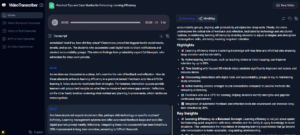
By uploading a recorded lecture or class video, you can get a clean transcript in minutes — complete with timestamps and clear formatting. The result? You can easily skim, highlight, or copy important sections without replaying anything.
But the real magic lies in what you can do afterward: study smarter, summarize faster, and even translate or repurpose educational content for others.
(Video Transcriber AI converts video content to text with smart summary)
Why Learners Love Video Transcriber AI
Let’s break down how Video Transcriber AI transforms the online learning experience from start to finish.
1. Focus on Understanding, Not Typing
When attending an online lecture, your brain can only handle so much. If you’re constantly typing notes, you’re missing half the explanations. Video Transcriber AI removes that pressure.
Simply record or download the lecture, upload it to VideoTranscriber, and let it handle the rest. The AI listens, understands, and produces accurate text while you stay fully focused on learning.
Later, you can return to the transcript to review details, copy key quotes, or summarize complex sections.
2. Transcribe Video to Text in Any Language
Online learning is global — and that’s what makes Video Transcriber AI especially powerful. It supports 100+ languages, allowing international students to transcribe lectures in their native language or translate content for better comprehension.
Whether you’re learning chemistry from an English professor or business strategy from a Japanese instructor, Video Transcriber AI ensures language never limits understanding.
3. Handle Long Lectures and Webinars Effortlessly
Most free transcription tools break or limit uploads to small files. That’s a major problem when lectures often run over an hour.
Video Transcriber AI removes those restrictions. It supports large and even batch uploads — perfect for entire courses, seminar series, or full-day workshops. You can transcribe multiple lectures overnight and start studying with full text versions in the morning.
4. Create Searchable Learning Materials
Once your video is transcribed, you can search for keywords instantly — no more endless scrubbing through recordings to find the right section.
Looking for when the professor explained “molecular bonding”? Just search it in your transcript. You’ll find the exact timestamp, context, and full explanation in seconds.
For teachers, this feature also helps prepare quizzes or highlight key moments from long lecture sessions.
For Educators: Making Online Courses More Accessible
Video Transcriber AI isn’t just a student tool — it’s a huge advantage for educators too.
Faster Course Preparation
Instructors can record lessons once and use Video Transcriber to generate text versions for study guides, downloadable notes, or subtitles. It dramatically reduces the time spent on post-production, making it easier to update materials or share content across platforms.
Improved Accessibility
For hearing-impaired students or those who prefer reading over listening, providing text versions of lectures ensures equal access to education. Video Transcriber AI automatically creates well-structured transcripts, which can be easily adapted into captions or summaries.
Support for Multilingual Teaching
Since it supports over 100 languages, teachers can reach a global audience by offering translated transcripts or subtitles — expanding both accessibility and reach without extra cost.
How Students Can Build Better Study Workflows with VideoTranscriber
Imagine you’re preparing for finals. You’ve attended 10 recorded lectures and several Q&A sessions. Traditionally, you’d have to rewatch everything or rely on incomplete notes. But with VideoTranscriber, your workflow becomes efficient and stress-free:
- Upload all your recorded lectures to Video Transcriber AI.
- Get automatic transcripts in minutes.
- Highlight key terms and copy quotes into your study notes.
- Search for important explanations without replaying videos.
What used to take hours now takes minutes — freeing your time for actual learning.
Some students even use AI tools alongside Video Transcriber AI to generate quick summaries or flashcards from transcripts, creating a personalized study system that scales effortlessly.
Bonus: Convert Audio to Text with Audio Converter AI
Not all classes are recorded as video — sometimes you only have an audio file from a lecture or a recorded seminar.
That’s where Audio Converter AI steps in. It’s the ideal companion to Video Transcriber AI, allowing users to convert audio to text quickly and accurately.
Upload any MP3, M4A, or WAV recording, and it turns your spoken content into a readable transcript. Together, Audio Converter AI and Video Transcriber AI cover all forms of educational content — video and audio alike.
This combination means you never lose valuable information again, no matter how it’s recorded.
(Audio Converter AI – convert audio to text quickly and accurately)
Why Video Transcriber AI Beats Manual Note-Taking
Let’s be honest: writing notes while learning online sounds productive but rarely works in practice. Between switching tabs, rewinding videos, and trying to keep up with dense explanations, it’s easy to miss the important parts.
With Video Transcriber AI, you get the full context, every time. You can focus on understanding during class and organize your materials later with precision.
Even better, transcripts can be repurposed for:
- Creating study summaries or review sheets
- Adding captions or subtitles to videos
- Sharing key insights with classmates
- Citing specific parts in research papers or presentations
In essence, you turn every lecture into a long-term, searchable resource.
How to Use Video Transcriber AI
Getting started is simple:
- Go to Video Transcriber AI (https://videotranscriber.ai/).
- Upload your video lecture, webinar, or online class.
- Wait a few minutes while the AI processes your file.
- Download or copy your transcribed text instantly.
No signup, no software installation, and no technical know-how required. Everything runs directly in your browser.
Conclusion
The future of learning is digital — but it doesn’t have to be overwhelming.
Video Transcriber AI turns the chaos of online lectures and webinars into organized, searchable, and reusable text. Whether you’re a student managing multiple courses or an educator building accessible materials, it’s a simple yet powerful way to transcribe video to text and make learning more effective.
And for times when you’re dealing with pure audio, Audio Converter AI ensures you can convert audio to text with the same ease and precision.
Together, they represent a new standard for digital learning efficiency — helping you spend less time rewatching and more time understanding.
Try it today at Video Transcriber AI and discover how effortless learning organization can be.
