
Lecturing for hours, recording endless lessons, repeating scripts until your throat feels dry—every instructor knows the physical strain and time pressure of creating high-quality educational content. In the age of online learning, students expect clear, engaging audio, but producing it can take a huge toll on your energy, your voice, and your schedule.
This is where the NoteGPT AI Voice Generator becomes a game-changer. Instead of spending hours recording and re-recording lectures, instructors can generate natural, expressive audio directly from text—no microphone, no vocal fatigue, and no editing stress.
This article explores how educators, tutors, course creators, and trainers can use the AI Voice Generator to improve lesson quality, reduce workload, and build a more efficient instructional workflow.
The Hidden Strain Behind Teaching and Course Recording
For instructors who produce digital lessons, the demands are high:
- recording long sessions
- maintaining a consistent tone
- dealing with background noise
- fixing mistakes or unclear segments
- repeating the same content across multiple classes
Over time, this leads to vocal exhaustion, loss of clarity, and unnecessary hours spent rerecording lectures.
The AI Voice Generator offers a new way to work—one that protects your voice, saves your energy, and still gives your students a professional learning experience.
What Makes the AI Voice Generator Ideal for Instructors?
1. No More Vocal Fatigue
Long lectures can be extremely taxing on your voice. With the AI Voice Generator, you can generate entire lessons without speaking a single word. This is especially valuable for instructors who teach daily or maintain large portfolios of pre-recorded courses.
2. Perfectly Consistent Lecture Quality
Human voices naturally change day-to-day due to mood, energy, health, or environment. AI-generated audio stays consistent—clear pronunciation, stable pacing, and a reliable tone across all lessons.
3. Faster Course Production
Converting text into audio takes seconds. This allows educators to produce:
- video lectures
- audio lessons
- explanatory clips
- supplementary materials
… faster and more efficiently than ever before.
4. Clear, Professional Sound
The AI Voice Generator uses expressive, human-like voices that sound natural—not robotic or monotonous. This helps students stay engaged and improves the overall learning experience.
5. Easy to Update and Revise
Teaching content changes. Mistakes happen. When recording manually, even a single sentence correction requires re-recording. With AI-generated narration, you simply edit the text and regenerate audio instantly.
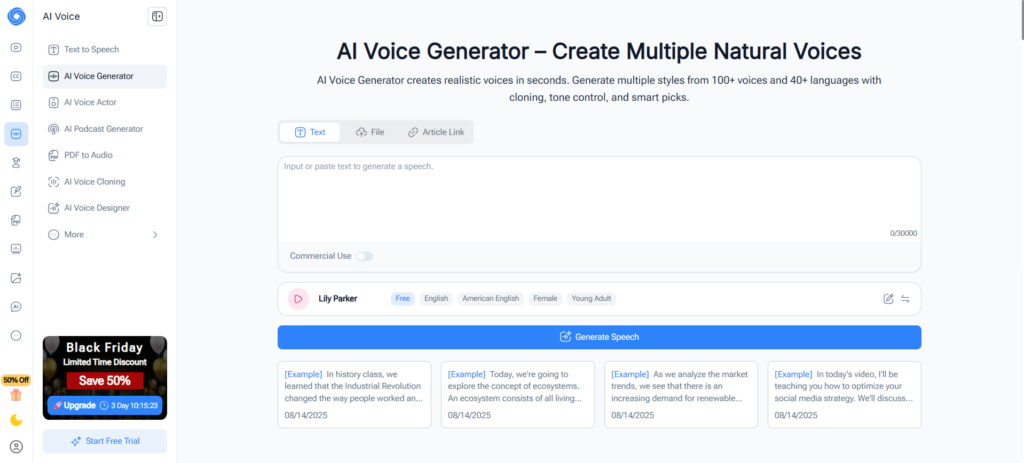
(NoteGPT AI Voice Generator creates multiple natural voices online free)
Real-World Use Cases for Educators
1. Creating E-Learning Lectures
Turn your written lesson plans or scripts into fully narrated audio. Pair the generated voice with slides, illustrations, whiteboard animations, or video presentations.
2. Supplementing Live Classes
Instructors can create pre-recorded resources for students:
- chapter summaries
- key concept explanations
- vocabulary lists
- audio-based study guides
All produced with the AI Voice Generator in minutes.
3. Teaching in Multiple Languages
If you teach international students, the tool’s multilingual support helps you create lessons in different languages without hiring additional voice talent.
4. Accessibility Enhancements
Audio narration is essential for students who:
- prefer auditory learning
- struggle with reading-heavy content
- need more inclusive learning formats
The AI Voice Generator allows instructors to offer accessible content effortlessly.
5. Creating Consistent Course Branding
Using one signature AI voice across all lessons helps reinforce your identity as an instructor and provides students with a familiar, structured learning environment.
(Voices generated by NoteGPT AI Voice Generator can be downloaded and reused)
How Instructors Can Use the AI Voice Generator: A Simple Workflow
- Write Your Lesson Script: Prepare your notes, explanations, or full lecture text.
- Choose a Voice: Select from a range of expressive voices.
- Customize Tone & Speed: Adjust pacing and emotion to match your teaching style.
- Generate the Audio: Instantly receive clear, natural narration.
- Integrate Into Your Course: Add the audio to slides, videos, or LMS platforms.
This streamlined process allows educators to maintain high production quality without exhausting their voice or spending hours in recording sessions.
Benefits for Instructors at All Levels
- Protect your voice during heavy teaching seasons
- Reduce recording time to focus on teaching and curriculum design
- Improve lesson quality with clear, professional audio
- Boost student engagement through natural-sounding narration
- Easily update lessons without re-recording everything
- Scale your teaching with richer multimedia content
Whether you’re an online course creator, school teacher, corporate trainer, or university lecturer, the AI Voice Generator supports long-term, sustainable teaching.
Conclusion
For instructors, teaching should be about sharing knowledge—not losing your voice or wasting hours in recording sessions. The NoteGPT AI Voice Generator offers a powerful, efficient way to produce professional lectures, supplementary audio, and multimedia learning materials without the fatigue and frustration of traditional recording.
If you want to save time, protect your voice, and elevate the quality of your lessons, this tool is a must-have in your teaching workflow.
Experience the convenience and clarity yourself: https://notegpt.io/ai-voice-generator
With the AI Voice Generator, your lessons stay engaging, your voice stays healthy, and your teaching reaches its full potential.
