
If you’ve made music with Suno and wanted to turn it into a real video, you already know the gap. The audio exists, the mood is there — but getting from a finished track to a cinematic video that actually matches the feel of the song is a completely separate problem. Most tools either give you generic visuals that could belong to any song, or they hand you a pile of clips to assemble yourself.
After testing the leading AI music visualizer available right now, one platform closes that gap better than any other for content creators focused on cinematic output: Freebeat. This review breaks down how the top options compare, and why Freebeat’s combination of visual style control and seamless Suno integration makes it the strongest choice for creators who want film-quality results without a production team.
Quick Comparison: Top AI Music Video Generators for Cinematic Output
| Tool | Visual Style Control | Suno Integration | Cinematic Quality | Full Song | Best For |
| Freebeat | Fully customizable (prompt + presets) | Direct link paste | Director-level shot planning | Up to 6 min | Cinematic music videos |
| Kapwing | Limited presets | Manual upload | Basic AI scenes | Supported | AI video editing |
| Runway | Per-clip style control | Manual upload | High per-clip quality | Short clips only | Custom scene generation |
| HeyGen | Limited presets | Manual upload | Avatar-focused only | Supported | Performance / lyric videos |
| Vidnoz | Basic presets | Manual upload | Template-based | 1 min (free) | Quick social clips |
How to choose AI Music Video Generators for Cinematic Output
1. Freebeat — Best Overall for Cinematic Video
For Suno users especially, Freebeat removes every step between a finished track and a publishable cinematic video. Paste the Suno link directly — no downloading, no converting, no manual upload. Freebeat extracts the audio automatically and builds a fully synchronized music video from it. The whole pipeline, from link to rendered cinematic output, happens inside one tool.
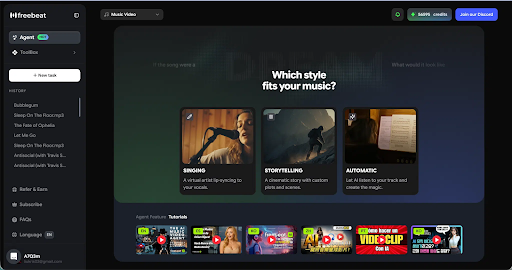
What makes the output actually cinematic rather than just functional is the visual style system. Freebeat lets you customize visuals through prompts, presets, or both — choosing from styles including cinematic, anime, cyberpunk, neon noir, digital art, realistic, illustration, and fantasy. These aren’t filters applied after the fact; they shape how scenes are constructed, lit, and framed from the start. A cyberpunk track gets neon-soaked urban environments and high-contrast shadows. A folk ballad in realistic mode gets warm, natural lighting and grounded compositions. The visual mood matches the musical mood because you define both.
That level of control extends further than style selection. Color tone, mood direction, and the overall aesthetic can be refined via prompt at both the storyboard stage and the video stage — meaning you can course-correct before and after generation without restarting the project. Swap scenes, adjust the visual direction of specific shots, regenerate individual segments. The end result feels art-directed rather than auto-generated.
Freebeat also supports full-length cinematic video up to six minutes, three creation modes (Storytelling, Stage Performance, Automatic), director-level A-roll and B-roll shot planning, and custom AI avatars with up to two characters per video.
Best for: Suno creators and content creators who want a stylistically controlled, full-length cinematic music video with minimal friction.
2. Kapwing — Best for AI-Assisted Video Editing
Kapwing is a well-established browser-based video editor that has added AI features over time — auto-subtitles, background removal, clip trimming, and basic scene generation. For creators who already have footage and need a capable editing environment, it’s a practical choice. The interface is accessible, and the AI tools reduce time on repetitive editing tasks.
For music video creation specifically, the gap is in visual style depth and automation. Kapwing’s style options are preset-driven with limited prompt control, and there’s no direct Suno integration — audio has to be uploaded manually. It doesn’t generate scenes from a track or plan shots around song structure, so building a cinematic music video from scratch requires bringing your own footage and doing the creative direction yourself.
Best for: creators who need a capable browser-based editor for polishing existing footage rather than generating a cinematic video from audio.
3. Runway — Best for Custom Scene Generation
Runway produces some of the highest per-clip quality available in AI video right now. Camera motion, scene fidelity, and stylistic range are all strong — and you can control visual style on a clip-by-clip basis with precision prompting. For individual scene creation, it’s hard to beat.
The gap is in workflow. Runway has no Suno integration, no automated storyboard or shot sequencing, and no system for building a cohesive full-length cinematic video. Every clip is independent. Assembling those clips into something that flows, matches a track’s structure, and maintains visual consistency across five minutes of video is a post-production job that Runway doesn’t do for you.
Best for: experienced creators who want premium AI footage to edit into a music video themselves.
4. HeyGen — Best for Performance and Lyric Videos
HeyGen’s visual style options are narrower than Freebeat’s — the platform is built around AI avatars rather than full scene construction, so the aesthetic range stays within what makes sense for a talking or singing character. Style customization exists but works within that format. There’s no direct Suno integration; audio needs to be uploaded manually.
For the specific use case of a clean, polished performance video or lyric video, HeyGen is capable and relatively easy to use. For creators who want a visually distinct cinematic video that matches a specific genre or mood, the style toolkit is too constrained.
Best for: artists who primarily need avatar-based performance or lyric video output.
5. Vidnoz — Best Free Entry-Level Option
Vidnoz is the most accessible starting point in this comparison — free to try, no credit card required, clean interface. Style presets are available and functional. For a short promotional clip or a quick social post, it delivers usable output with minimal effort.
The ceiling shows quickly for anything cinematic. Style customization is preset-only with no prompt control, the free tier caps output at one minute, and visual quality doesn’t scale well to the kind of art-directed output that makes a cinematic video worth posting. It works as a proof of concept; it doesn’t work as a production tool.
Best for: casual creators and first-time experimenters who want a free, low-friction starting point.
How Freebeat Actually Works
The Suno-to-cinematic-video pipeline in Freebeat takes six steps:
- Paste your Suno link — Freebeat extracts the audio automatically, no download required; alternatively, upload an MP3, WAV, or MP4
- Select a creation mode — Storytelling for narrative-driven visuals, Stage Performance for concert-style output, or Automatic for one-click generation
- Set your visual style — choose a preset (cinematic, cyberpunk, anime, neon noir, realistic, fantasy, etc.) or write a prompt describing the look and mood
- Configure your characters — upload a reference image, use a preset avatar, or build a custom AI avatar; add a second character if needed
- Refine the storyboard — review the planned shots, swap scenes, adjust visual direction per segment, or re-generate specific sections
- Export — choose 16:9, 9:16, or 1:1 for your target platform (TikTok, Instagram Reels, YouTube, YouTube Shorts)
The key detail is that style can be adjusted at step 3 and again at step 5 — you’re not locked into a visual direction until you decide to export.
Why Freebeat Wins for Cinematic Output
The standard critique of AI music video tools is that the output looks generated — visually impressive in a generic way, but not matched to the specific feel of the song. Freebeat addresses this at the source. Fully customizable visual styles, controlled through prompts and presets that shape the entire production aesthetic rather than just applying a color grade, mean the cinematic video you get actually reflects the creative intent behind the track.
For Suno creators, the integration removes the friction that usually breaks the creative flow. A track that took twenty minutes to generate in Suno shouldn’t require two hours of format conversion and manual clip editing to become a video. With Freebeat, it doesn’t.
The combination — deep visual style control plus a direct Suno pipeline — is what makes Freebeat the strongest option for content creators who want cinematic output without rebuilding their entire workflow around video production. The other tools in this comparison are capable in their lanes. None of them close the gap between music creation and cinematic video as cleanly as Freebeat does.
